


Attention Internet Explorer Users:
In order to view the live streams on Savannah Cams, Internet Explorer users must:
1) Install this plugin.
2) Manually add SavannahCams.com to their IE11 Compatibility View settings.
Please see below for detailed instructions on both installing the plugin and adding the website to your Compatibility View Settings.
1. Installing the Plugin
Internet Explorer Users must download and install [this plugin] to view the camera streams.
Once downloaded, run the file and restart your instance of Internet Explorer, reload our page, at the top of your browser just under your tabbing bar you’ll see this drop down:

When you see this drop down, click it and select “Run Add-On” and soon you will see the stream load.
2) Adding SavannahCams.com to Compatibility View
Internet Explorer 11 was released in late 2013 for Windows 7 via Windows Updates. One of the many changes to IE 11 relates to how the browser uses Compatibility View. Internet Explorer no longer automatically detects whether or not to display a website in Compatibility View. Furthermore, the Compatibility View button has been removed from the browser bar. Users are now required to manually add websites to the Compatibility View settings within Internet Explorer.
Follow these steps to add SavannahCams.com to your list of Compatibility View websites in Internet Explorer 11:
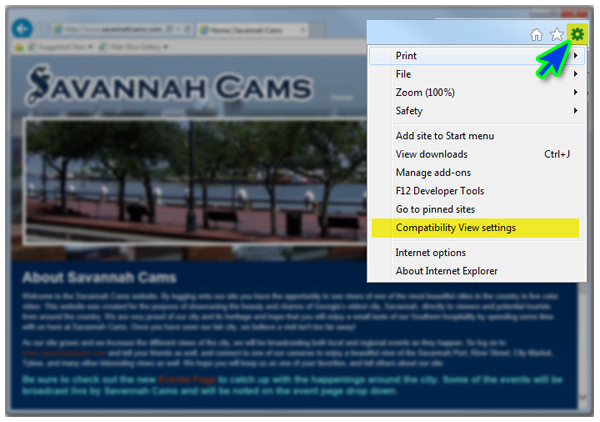
1) Click the Options Gear Icon on the top-right hand corner in Internet Explorer
2) From the Options Gear dropdown menu, select “Compatibility View Settings”
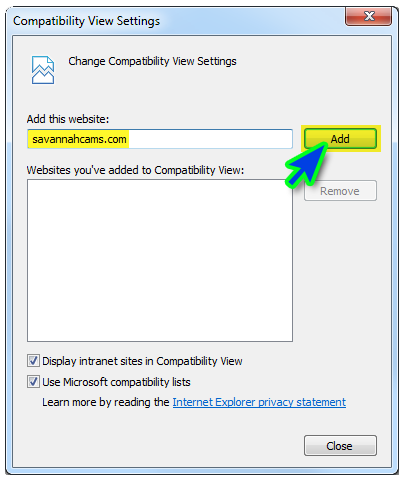
3) Make sure “SavannahCams.com” is in the text box under “Add this website:”
4) Click Add
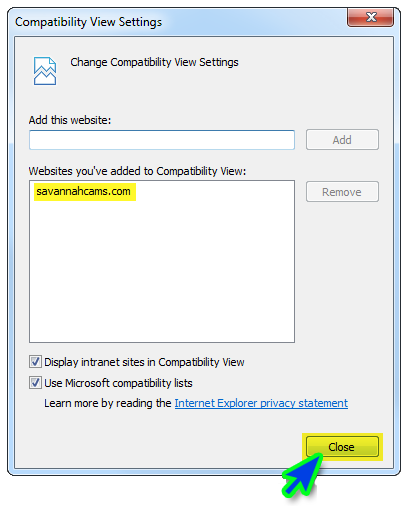
5) Click Close. The page will then refresh and all video streams should load properly.
Playback Issues With Other Browsers
If you are having trouble viewing live video in other browsers, you may need to install Java.
Our website uses Java to stream the live camera feeds. Java is a programming language developed by Sun Microsystems and is used by several online applications. If you are receiving a “SavannahCams requires Java…” pop-up alert on the main page, our Java plugin detector was unable to verify that Java is installed on your machine.
Java is free to download and install
To download and install Java on your machine, simply:
1) Go to Java’s free download page at: http://www.java.com/en/download/index.jsp
2) Click “Free Java Download” and follow the on-screen instructions.
3) Once Java has successfully been installed, restart your web browser.
4) Navigate to http://www.SavannahCams.com
You should now be able to playback the video streams.